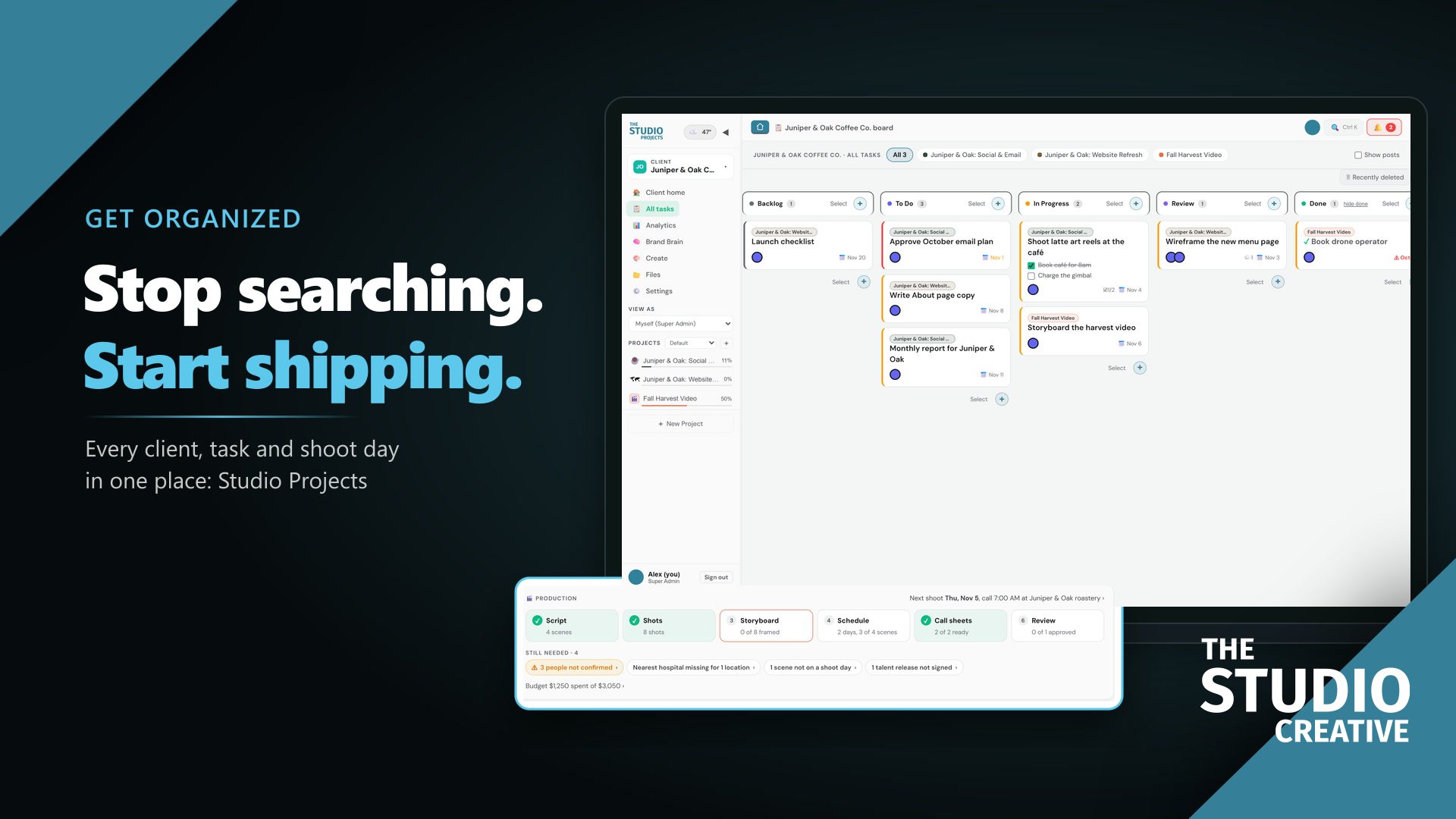
Ask any small business owner where the week went and you will hear the same answer: looking for things. The latest version of a script. The email where the client approved the logo. Which lead asked for a quote on Tuesday and never heard back. None of that is the work, but all of it stands between you and the work. Getting organized is not a personality trait. It is a system, and it is the cheapest growth tool a business has. Here is what the research says it costs to skip it, how we organize the front of our own business in CRM Connect and the production side in Studio Projects, and what organized looks like when it pays off.
At a glance
- Disorganization costs a quarter of the week. In Atlassian's 2025 research, leaders and teams said they spend about a quarter of their time just searching for answers.
- Most of the day is work about the work. Asana found knowledge workers spend 58% of their day coordinating work instead of doing it.
- Creative teams feel it most. In PMI's 2025 survey, 97% of marketing and creative professionals hit a major campaign problem in the past year, and 9 in 10 said great creative depends on great project management.
- Messy contacts cost sales. 37% of CRM users told Validity they lose revenue because of poor data.
- Organized means two systems. A CRM for every person who might pay you, and a project tool for every job you have already won. We run on both.
What disorganization really costs
The numbers are consistent across very different studies, and none of them are flattering.
- A quarter of the week goes to searching. Atlassian's State of Teams 2025, a survey of 12,000 knowledge workers and 200 executives, found that leaders and teams waste about 25% of their time just searching for answers.
- More than half the day is coordination. Asana's Anatomy of Work Index puts the share of the day spent on work about work, the status checks, the chasing and the hunting for files, at 58%.
- Creative projects go over budget and late. In a 2025 PMI survey of marketing, advertising and creative professionals, 97% faced at least one major campaign challenge in the past year. The most common were going over budget (55%) and missed deadlines (54%). Nine in ten agreed that great creative campaigns depend on great project management.
- A messy CRM loses deals. In Validity's State of CRM Data Management in 2025, 76% of 602 CRM users said less than half of their CRM data is accurate and complete, and 37% said they lose revenue as a direct result.
- Every switch costs focus. Attention researcher Gloria Mark has measured the average time people stay on one screen before switching at about 47 seconds. Every tab you open to find a file is another switch.
Read those together and the pattern is plain. The cost of disorganization is not one big failure. It is a thousand small searches, a lead nobody followed up, a revision that went to the wrong person, and a shoot day spent asking which take was the good one.
What "organized" actually means
Organized does not mean tidy folders. In every business we have built systems for, it comes down to five habits.
- One home for each kind of thing. People live in the CRM. Jobs live in the project tool. Nothing important lives in someone's inbox.
- Sorted at the door. Every lead, file and task is labeled the moment it arrives, so nobody sorts later.
- Everything has a next step and an owner. A record with no next step is a record that will be forgotten.
- Status you can see without asking. If you have to send a "where are we on this?" message, the system has failed.
- Templates for anything you do twice. A good template is a decision you only make once.
How we organize the front of the business: CRM Connect
Everything before a signed job is a person, so it belongs in the CRM. We run our own studio on CRM Connect, the same system we set up for clients, and it is organized around one rule: a lead should land in the right place without anyone touching it.
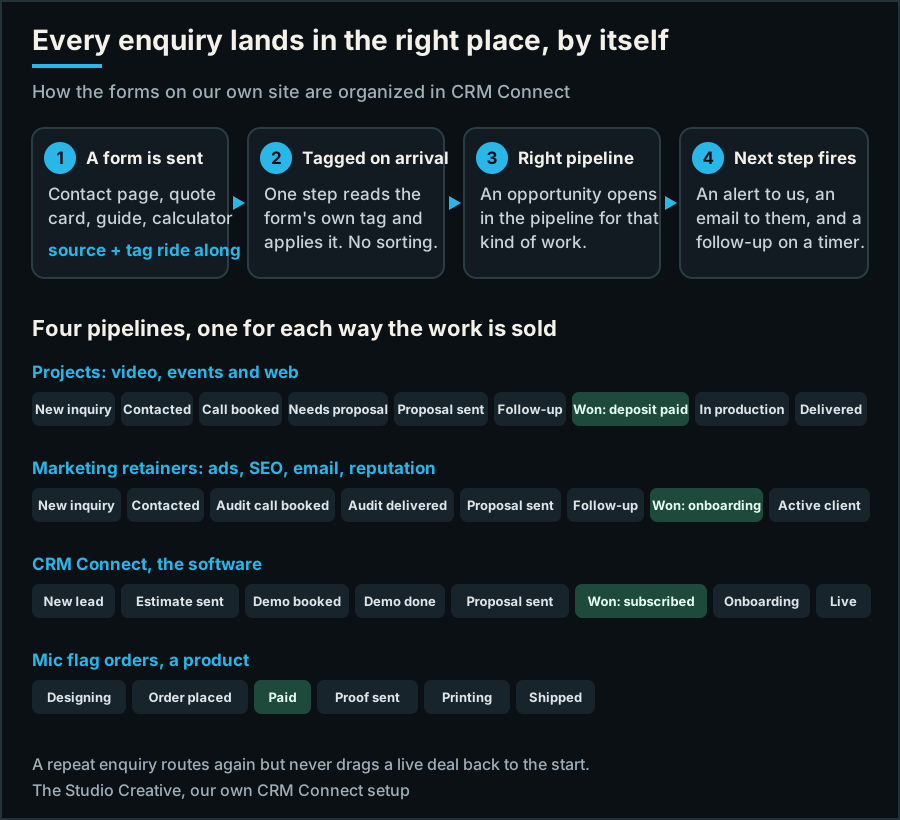
- Every form says where it came from. The contact page, the quote card, every calculator and every free guide sends its own source and tag, so a lead's first record already says what they want.
- One step does the sorting. A single automation reads each form's tag and applies it. Adding a new form takes a tag, not a new workflow.
- Pipelines that match how the work is sold. A one-off video job, a monthly marketing retainer, a software subscription and a product order move through different steps, so each has its own pipeline instead of one generic list.
- The next step fires by itself. We get an alert, the person gets a reply, and a follow-up is scheduled. A repeat enquiry routes again, but never drags a live deal back to the start.
How we organize the work: Studio Projects
A CRM is the right home for people. It is the wrong home for a shoot day, a website launch or a month of client posts, because those are jobs with steps, owners, files and deadlines. For that we built Studio Projects, our own project management app, and we run our studio on it. It is organized the way a studio actually works: by client first, then by project, then by task.
Everything below is a real screen from the app, shown in its demo workspace with a made-up coffee brand, Juniper & Oak Coffee Co.
Every task for a client on one board
Pick a client and the whole app follows them. "All tasks" puts every task from every one of that client's projects on one board, in columns that are the status itself: Backlog, To Do, In Progress, Review, Done. Dragging a card to the next column is how work moves on, so the board is never out of date.
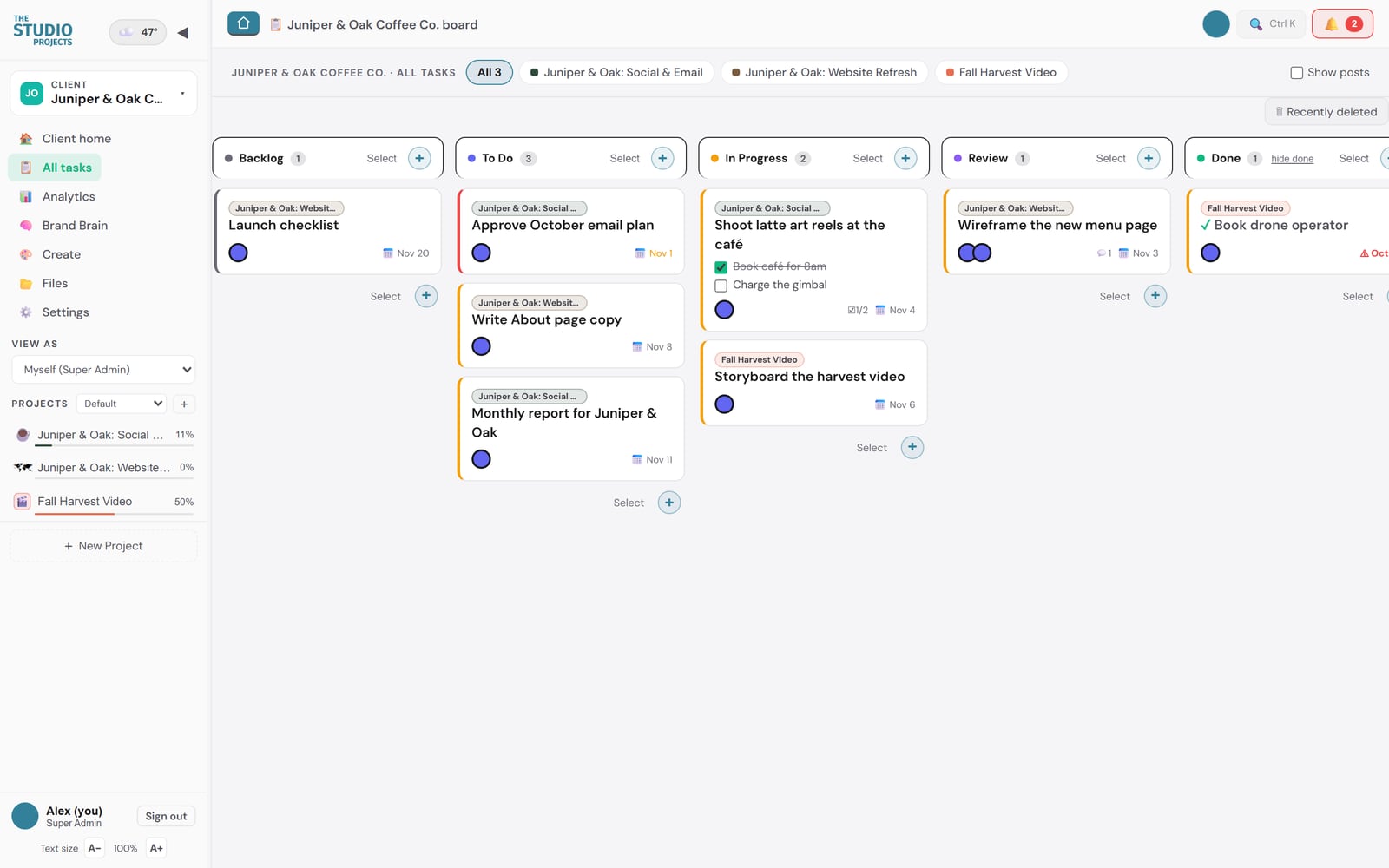
- Views for every way of thinking. The same tasks by status, by due date, as a list with bulk changes, or by person, where dragging a card to someone reassigns it.
- Templates for work you repeat. Website redesign, brand video production, CRM setup, a social content pack and logo and brand identity are built in, and you can save your own.
- Add a task in one line. Type "Logo round 2 friday 3h @Sam" and the app fills in the title, the day, the estimate and the owner.
- Find anything fast. One search, from any screen, looks through tasks in every project you can see.
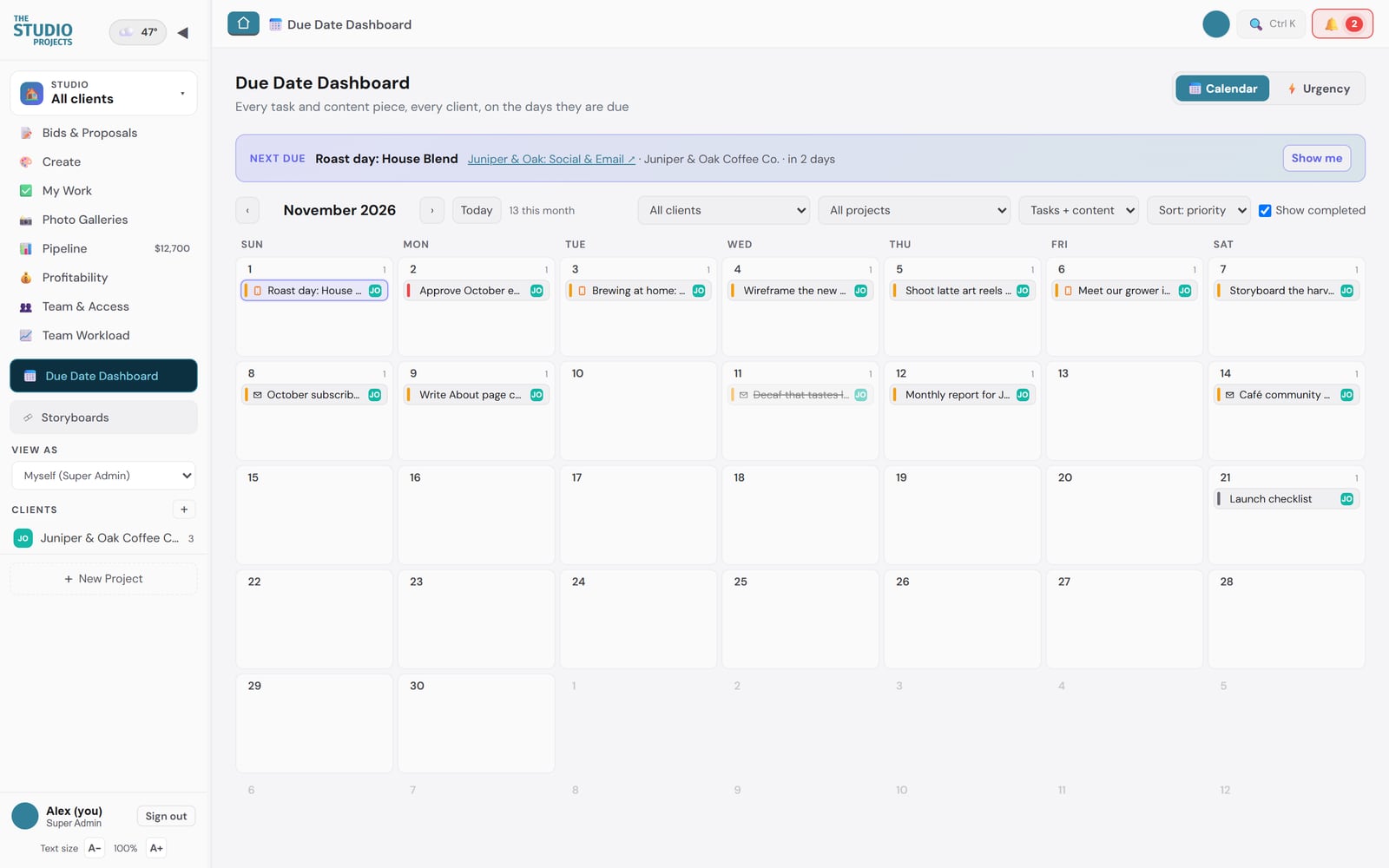
Everything due, across every client, on one calendar
The Due Date Dashboard puts every task and every content piece for every client on a single month, with the next thing due pinned at the top and an urgency view when the month gets busy. Each morning, a reminder email lists what is overdue, what is due today and what is due tomorrow.
A list of what needs you, and proof they saw it
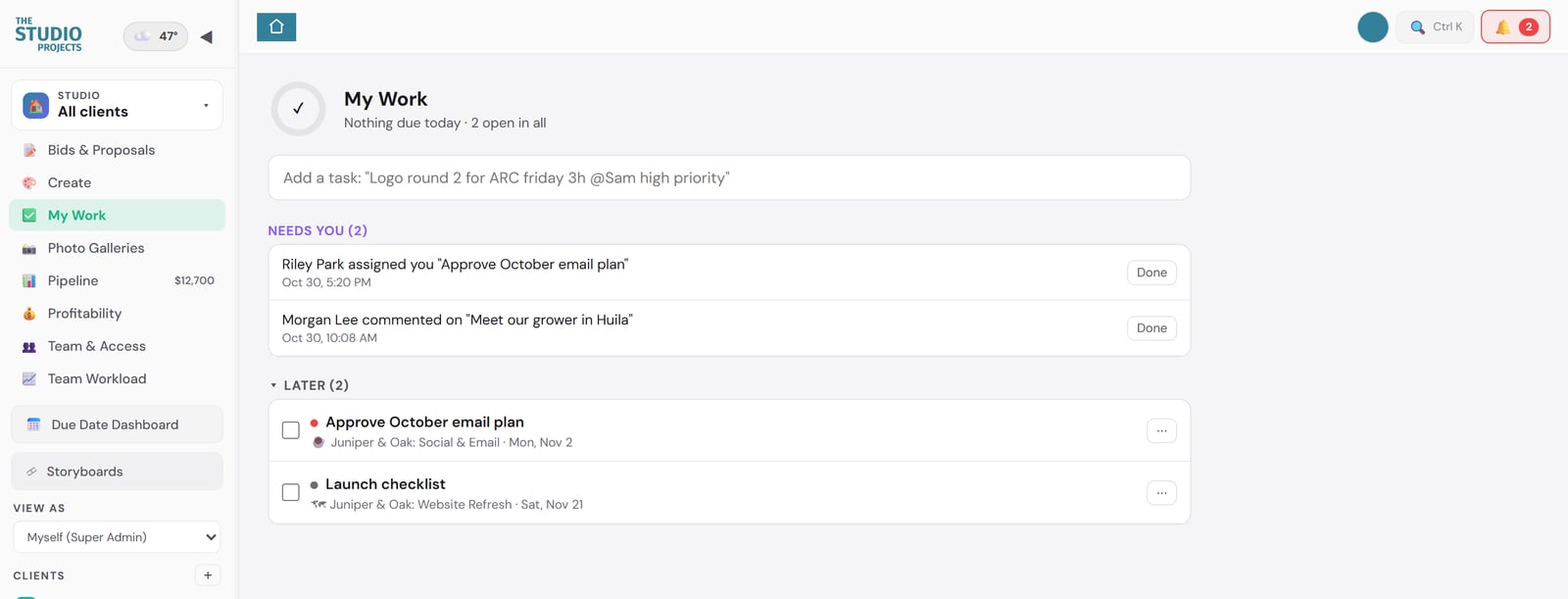
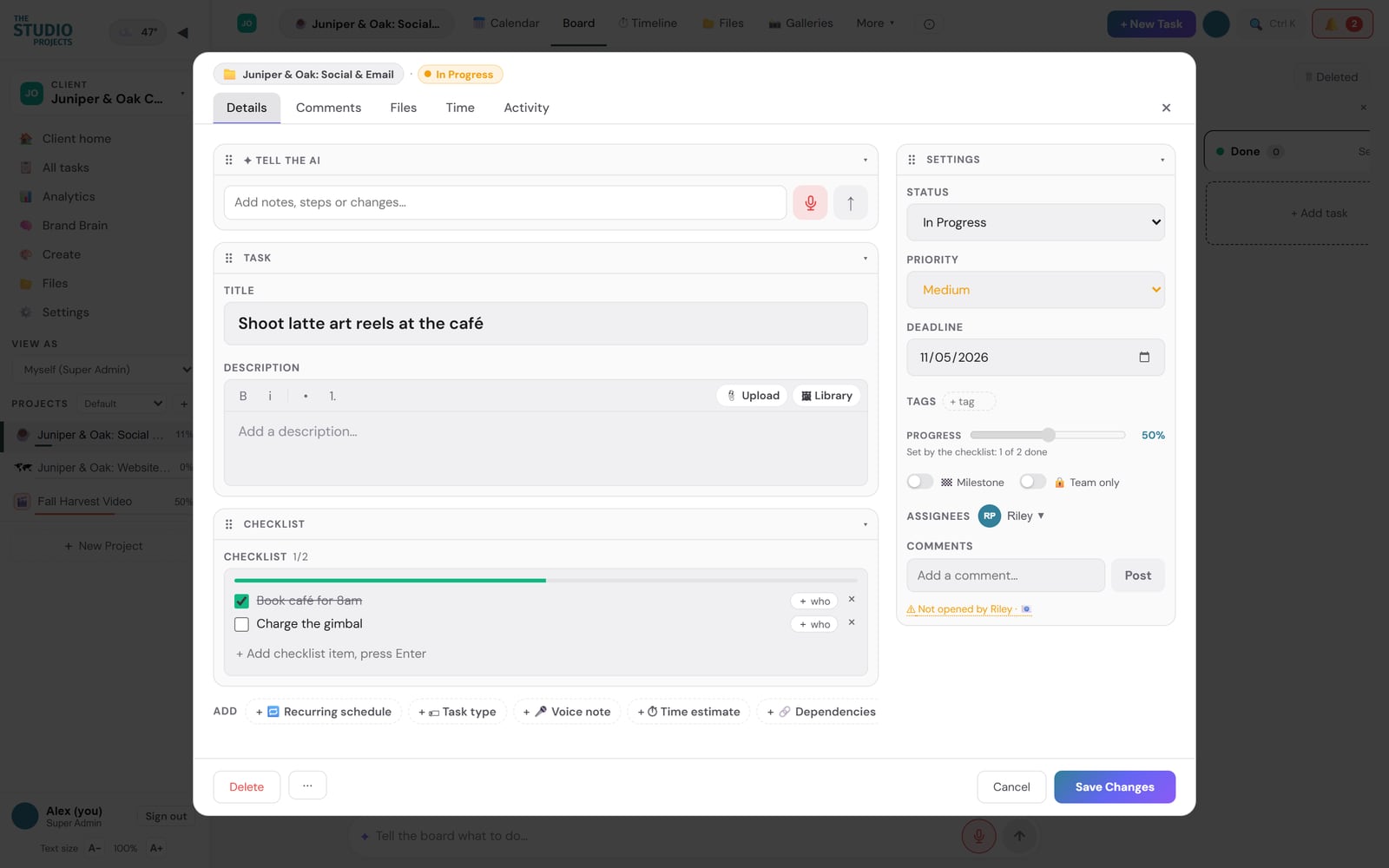
My Work gathers everything waiting on you into Overdue, Today, This week, Later and No date, along with mentions, client comments and checklist items someone handed you inside a bigger task. Inside each task, every assignee shows as Not opened, Seen or Reviewed, so "did you get my message?" stops being a question. Tasks carry checklists, comments with @mentions, files, blockers, milestones, recurring schedules and a timer that compares estimated hours with real ones.
Shoot days that run on time
Video is where organization pays the most, because a missing permit or an unconfirmed actor costs a whole day. A video project in Studio Projects gets the tabs of a shoot in the order it happens: Script, Shots, Storyboard, Schedule, Call sheet, People, Review and Budget. Its home screen says, in one line, what is still missing before anyone loads a van.
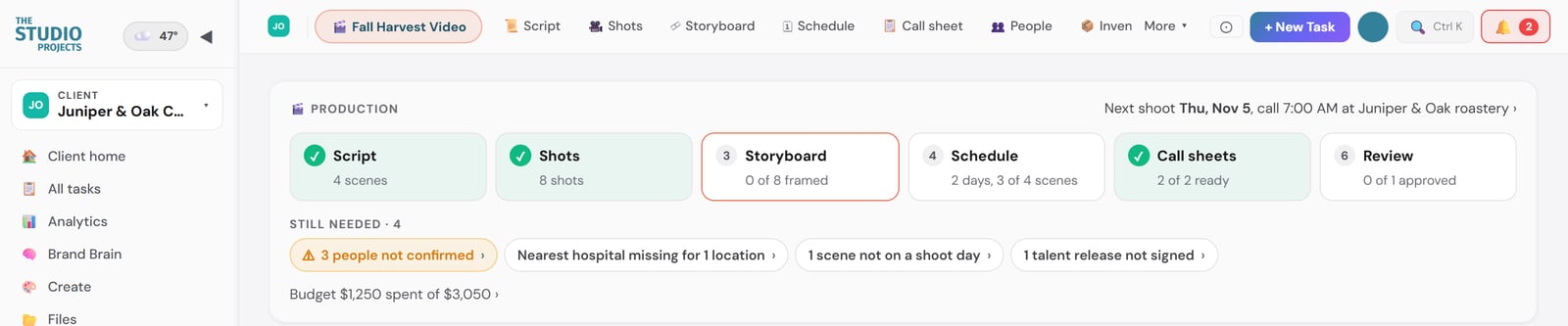
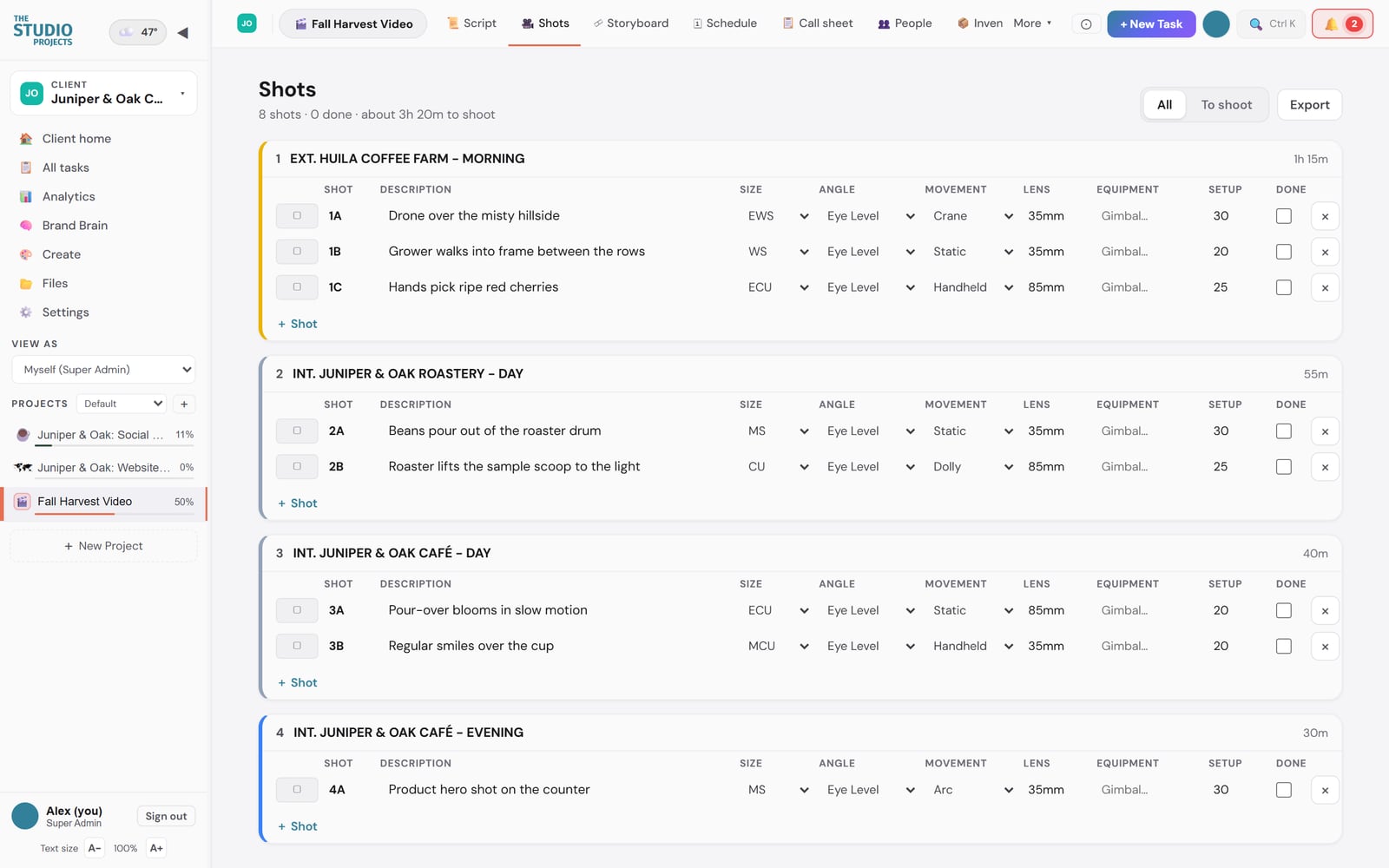
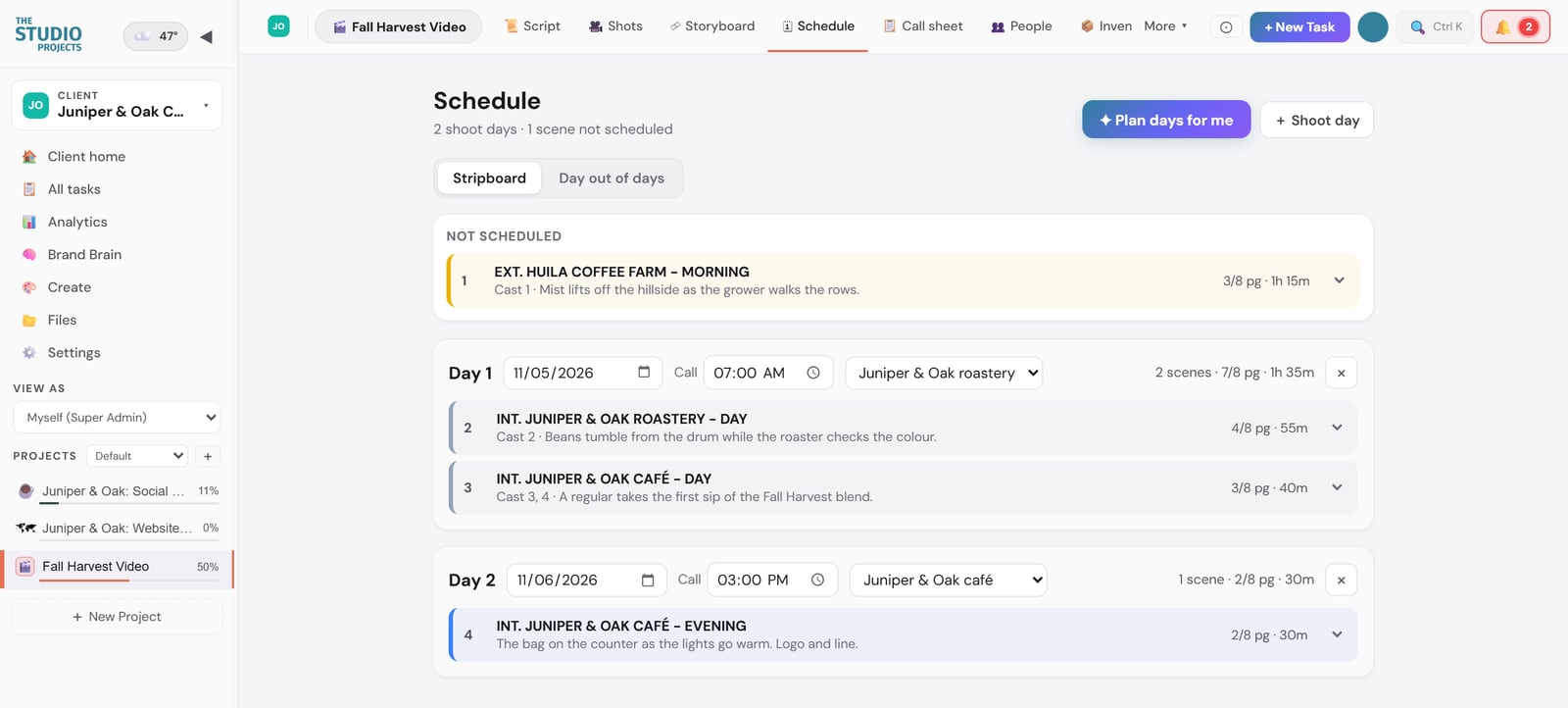
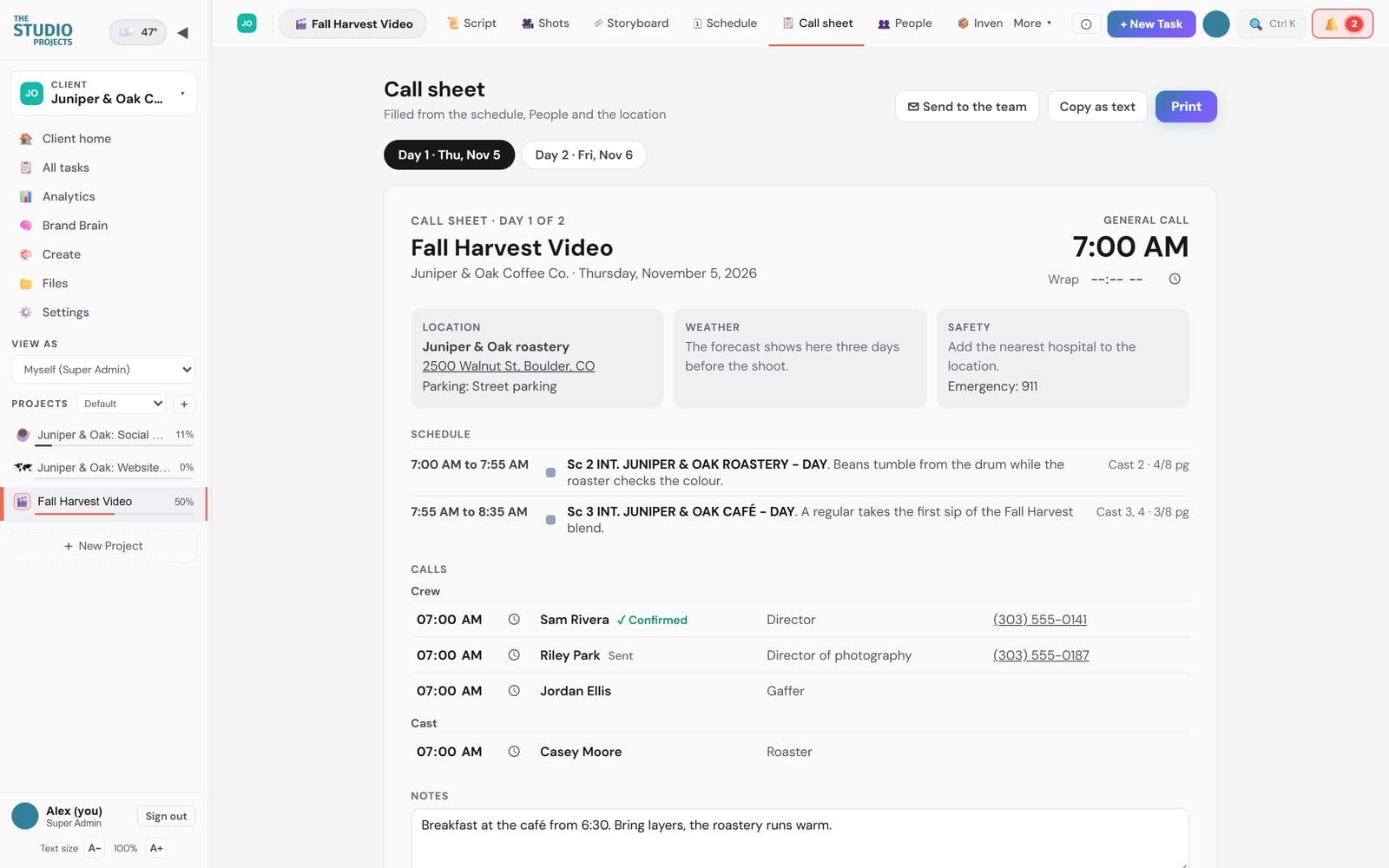
The script is broken down scene by scene and tagged for cast, props and wardrobe. The shot list exports to a spreadsheet. The stripboard builds the shoot days, and a Day out of days grid shows which days each performer works. Then the call sheet fills itself in from the schedule, the people and the location, and goes to the team by email with a Confirm button.
The business at a glance
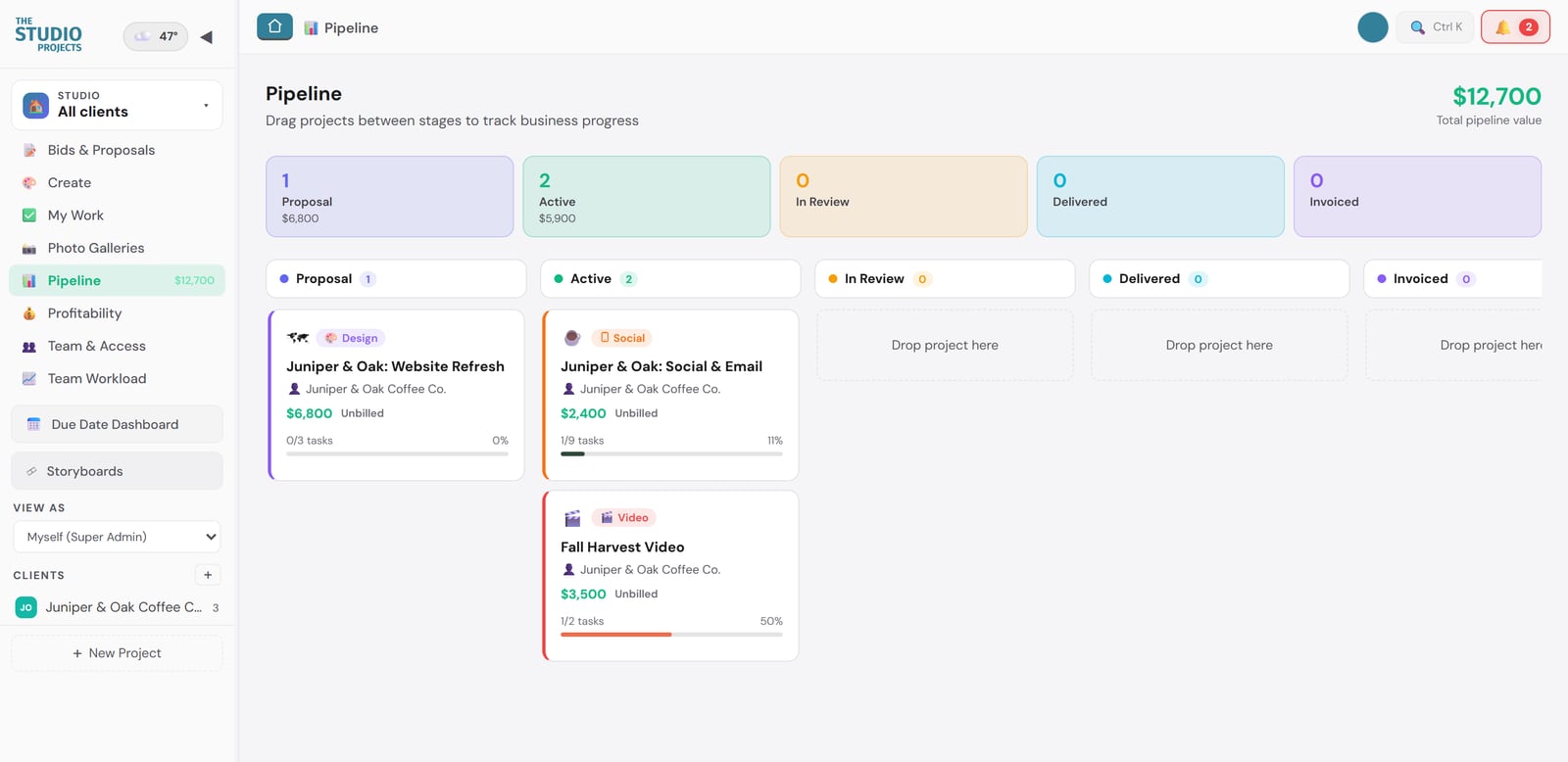
Studio Projects also answers the questions an owner asks on a Monday morning. The Pipeline shows every project by stage, Proposal, Active, In Review, Delivered and Invoiced, with the value of each and a running total. Team Workload shows who is booked and who has room for the next six weeks, using task estimates and taking time off out. Profitability compares the time logged on a job with what the job was sold for.
Where the two systems meet
The CRM and the project tool each do one job, and the handoff between them is where most businesses drop the ball. A signed proposal sits in an inbox, and the project never quite starts. In Studio Projects, when work is won, from an accepted quote, a signed bid or a deal marked won in the CRM, a card appears offering to start the project from a template. The person who said yes in the CRM becomes a project with tasks, owners and dates without anyone retyping it.
The results of getting organized
Organization is only worth it if something changes. Here is what changes when the systems above are doing the remembering for you.
- Less time searching. Every file, task and conversation has one home and one search, so finding something takes a keystroke instead of a morning.
- No lead waits. Every enquiry is tagged, routed and answered by the system, so the follow-up happens whether or not anyone is at a desk.
- Deadlines stop sneaking up. Everything due is on one calendar, a reminder arrives every morning, and the app flags a task whose blocker is due after it.
- The status meeting gets short. The board, the pipeline and the "seen" markers answer "where are we?" before anyone asks.
- Shoot days run to plan. Missing confirmations, releases and locations show up as a checklist days before the shoot, not as a phone call on the morning of it.
- You can see the money. Pipeline value, workload and profitability are a click away, so pricing and hiring are decisions, not guesses.
We plan our own productions this way, including the comedy series we produce with Hot Cheap Comedy, which has picked up 33 festival laurels and 5 wins. Made in collaboration with Hot Cheap Comedy, who write the scripts. The Studio Creative handles everything else: production, directing, cinematography, editing, and post. The organizing is ours, and it is the same system we offer you.
Get Studio Projects
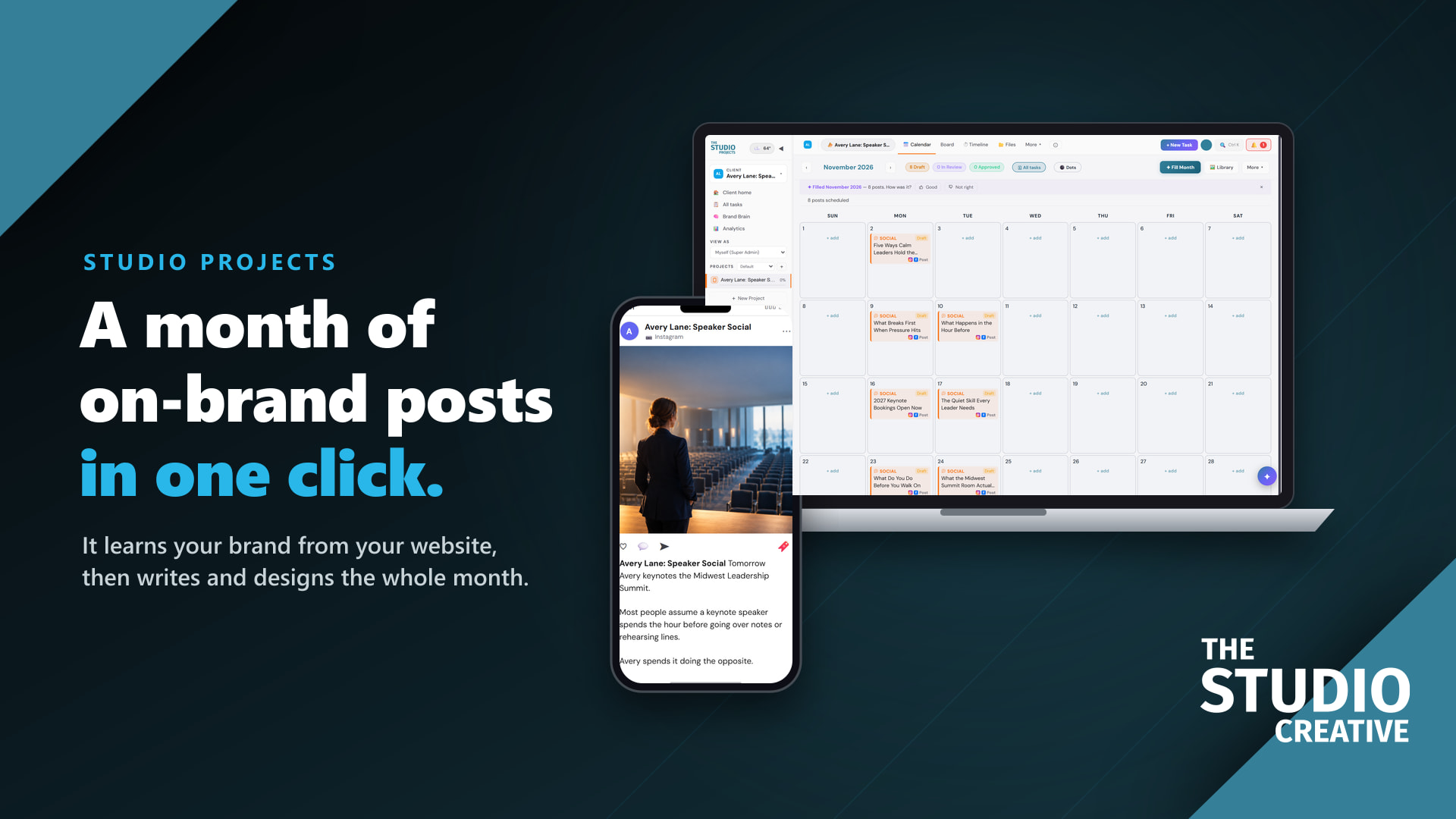
Studio Projects is open by invitation while we onboard our first members. Plans start at $29 a month for one business running its own work, $79 for a busy business or a freelancer with a few clients, and $199 for agencies managing many brands, each with two months free when paid yearly. If social content is part of your work, it also fills a month of on-brand posts in one click; see that side of the app here.
Want the CRM side set up for you? We build and run CRM Connect for clients the same way we run it for ourselves, from the forms and tags to the pipelines and follow-up.
Questions people ask
Do I need both a CRM and a project management tool?
If you sell work and then deliver it, yes. A CRM organizes people and the path to a sale. A project tool organizes the work after the sale. Trying to run delivery in a CRM, or sales in a task board, is how leads and deadlines get lost. Studio Projects can start a project for you when a deal is marked won in the CRM.
Is Studio Projects only for video production?
No. Projects come in types, social, video, web design, podcast, live event, photography, book, CRM and other, and each type opens with the tabs that job needs. Video projects add the shoot tabs; every project has the board, calendar, files and timeline.
Can my clients see their projects?
Yes. Clients get a portal with a cut-down set of tabs and only the tasks you mark visible to them. They can approve posts and review videos, websites and book proofs from a link, and send requests that land in your inbox as tasks.
Can I try it before I join?
Yes. The sign-in page has a demo with a made-up coffee brand, no account needed. Access to a real workspace is by invitation while we onboard our first members.
What is the first step to getting organized?
Pick one home for people and one home for work, then label everything at the door. Start with your contact forms: give each one a tag so every lead arrives already sorted. That single change removes most of the manual sorting a small business does.