AI lead follow-up means every enquiry gets an answer the moment it arrives, lands in the right place in your sales pipeline and gets followed up until the person replies, books or says no, without anyone remembering to do it. We run our own business this way and set it up for clients in CRM Connect, our marketing system: forms that file themselves, confirmation emails that go out at once, an AI appointment setter that books calls, a voice agent that answers the phone and a chatbot on the website. A person still makes the real reply.
AI Lead Follow-Up That Answers Every Enquiry
In this article8 sections
At a glance4 key points
- Nobody waits in silence. A confirmation goes out the moment a form is sent.
- Every lead is filed. Tagged by what they asked for and placed in the right pipeline.
- AI answers when you cannot. Calls, chats and booking, day or night.
- Follow-up stops on a reply. Nobody gets chased after they have answered.
The leak most businesses have
Most businesses do not have a lead problem. They have a follow-up problem. A form arrives during a job, a call goes to voicemail after hours, a "let me think about it" never gets a second email. Each one was a customer who was ready, and the business never found out. AI is good at exactly this kind of work: answering instantly, filing neatly and remembering to check in.
What happens when someone fills in a form on our site
- Spam is stopped first. A hidden trap field, a check on how fast the form was filled, a block list and Cloudflare's quiet human check keep junk out of the CRM.
- It is tagged by what they asked for. A website enquiry, a speaker, an event planner and a mic flag order each get their own tag.
- It lands in the right pipeline. We run four: projects, marketing retainers, CRM Connect and mic flag orders, each with stages that match how that work is actually sold.
- They get a confirmation at once, and a person replies, usually the same business day.
- Follow-up runs by itself. A short series of useful emails, which stops the moment they reply or book.
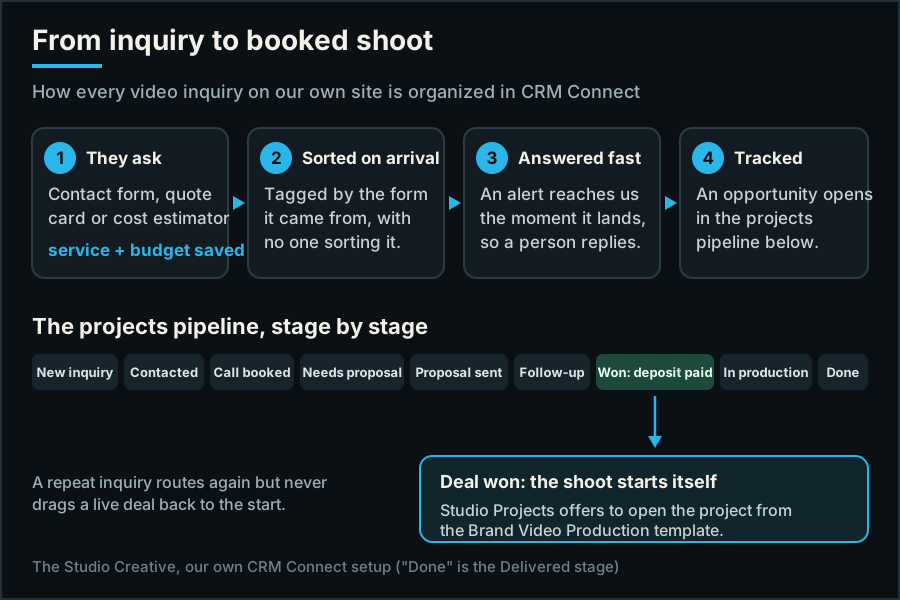
We also never push a cold calendar on anyone. The booking calendar is offered after someone has told us what they need, so the call starts with context instead of "so, what are you looking for?"
How to set up follow-up that does not feel automated
Whatever system you use, these five rules are what make follow-up helpful instead of annoying:
- Confirm instantly. A short "we got it, here is what happens next" email the moment a form arrives.
- Tag by what they asked for. A quote request and a newsletter signup should never get the same emails.
- Have a person write the real reply, ideally the same business day.
- Teach in every follow-up. Each email should be worth reading even if they never buy.
- Stop the moment they reply or book. Nothing loses trust faster than a reminder after they already said yes.
The AI that answers when you cannot
For clients we switch on the AI parts of CRM Connect, set up to sound like their business:
- AI appointment setter. It follows up with new leads and books them onto your calendar, so a ready buyer does not have to wait for office hours.
- AI voice agent. It answers and qualifies calls you miss, so an after-hours caller talks to something helpful instead of a voicemail beep.
- AI website chatbot. It answers visitors on your site and turns a question into a lead.
- AI content. Graphics, short video and posts for the follow-up and social side.
Why it improves the customer's experience
Done well, none of this feels like automation to the customer. It feels like a business that is paying attention: an answer right away, a reply from a real person soon after, a reminder before the appointment, and no awkward chasing once they have said yes or no. Every conversation is in one place, so whoever picks up the thread knows what was already said.
Organized for the owner, too
Every enquiry is a card in a pipeline, with its source, what they asked for and every message attached. Each month our analytics are read by AI and turned into a short list of what to fix next, like a page that gets seen in Google but rarely clicked. You see what is working without digging through reports.
What it costs
For reference, CRM Connect is $127 a month per account, and our marketing plans that include the AI appointment setter start at $1,250 a month. The plans page lists what each one includes, if you want to compare it with what you use now.
Questions owners ask
Will AI talk to my customers without me knowing?
Only in the ways you choose, using the answers you approve. Every conversation is saved in the CRM, so you can read exactly what was said.
Do I still need to reply personally?
For real enquiries, yes, and that is the point. AI covers the first minutes and the follow-up; your reply is what wins the work.
What if someone already replied?
The follow-up stops as soon as they reply or book, so nobody gets chased after they have answered.
Can you set this up on my current website?
Usually, yes. CRM Connect can take forms from most websites, or we build the site with it connected. See how setup works.
Was this useful?
AI lead follow-upAI appointment setterAI voice agentAI chatbot for small businesslead follow-up automationCRM for small businesssales pipelinespeed to leadCRM ConnectThe Studio Creative